Using an EMI Calculator, you can easily manage your finances during the course of a loan. Whether you are applying for a home loan, auto loan, or education loan, this tool helps you predict your Equated Monthly Instalments (EMI), total amount paid over the term of the loan, and repayment schedule. With real-time results and […]
Using an EMI Calculator, you can easily manage your finances during the course of a loan. Whether you are applying for a home loan, auto loan, or education loan, this tool helps you predict your Equated Monthly Instalments (EMI), total amount paid over the term of the loan, and repayment schedule. With real-time results and customizable factors, you will know exactly what to expect before making commitments to any loan.
The EMI Calculator is meant to make calculations simple. You simply enter the basic information about your loan, and you are instantly able to see how much you will have to pay each month.
| Input | Label | Type / Format |
| Loan Amount/Principal | Loan Amount (USD) | Numeric ($) with thousands separators; shorthand like 250k allowed |
| Annual Interest Rate | Interest Rate (% per annum) | Percentage input: e.g., 3.5, 5.25 |
| Loan Term | Term/Tenure | Select years (10, 15, 30) or enter custom months |
| Start Date | First EMI Date | Default set to current month; choose via calendar picker |
The calculator has the ability to generate results once you enter your details in real-time. These numbers provide you with a clear picture of what you will have to pay in repayments:
These visuals help you see how much of your money goes toward interest at the beginning and how it grows quickly as you start to pay the principal.
An EMI Calculator includes a detailed amortization schedule or the breakdown of each payment over the loan period.
| Key Features | Details |
| Sticky Table Header | For Easier Navigation |
| Export Options | CSV and PDF |
| Layout | Print-friendly |
| Filter Toggle | Switch between a detailed monthly view and a yearly summary. |
| Monthly View | Shows each individual EMI with principal, interest, and remaining balance. |
| Yearly Summary | Consolidates all 12 months into a single yearly row for quick reference. |
With this schedule, you can see how you are progressing with your repayments and how much equity you are establishing or paying down your loan balance.
See your debt erode over time with our breakdown of the Loan Amortization Calculator.
The EMI Calculator is based on a standard mathematical formula to calculate the fixed monthly payments.
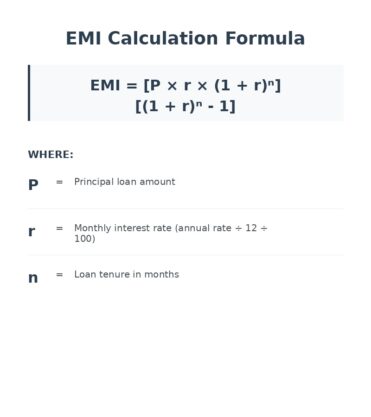
Formula:
EMI=P×r×(1+r)n(1+r)n−1EMI = frac{P times r times (1 + r)^n}{(1 + r)^n – 1}EMI=(1+r)n−1P×r×(1+r)n
Where:
This formula makes sure that all EMIs are constant, but the interest part and the principal part vary over time.
Making extra payments on your loan, either as lump sums or as additional monthly payments, can significantly decrease the amount of interest you pay on your loan. The calculator simulates such scenarios and helps you understand how fast you can close your loan.
Each type of loan has different terms and other fees. The EMI calculator adjusts itself as follows:
A Loan Calculator explains how different interest rates and compounding periods change your total cost.
Borrowing money is a huge commitment, and with an EMI calculator, you are in a position to make smart financial decisions. Here’s how it helps:
By using simulation tools, you will be able to determine whether a loan is comfortably within your financial plan.
EMI or Equated Monthly Installment is your fixed monthly payment, which you make towards the loan, and it includes principal and interest.
Yes, for fixed-rate loans. However, the balance of interest vs. principal shifts, with more interest in the beginning and more principal toward the end.
It is geared towards fixed-rate loans. For floating rates, it provides an approximate estimate.
Prepayments decrease the outstanding principal, which leads to either reduced tenure or reduced EMIs, depending on the terms of the lender.
By default, no. However, you can add them as optional parameters.
Yes. The calculator works on numerical inputs. Currency symbols are there for reference only.
Yes, it’s completely free and available for unlimited use.