Estimate your monthly payments, total interest, and payoff schedule with a loan amortization calculator. Planning a loan can feel overwhelming when trying to understand how much you need to pay over time. An amortization loan calculator helps you estimate your calculations accurately. It gives you the clarity needed to make a long-term financial commitment, such […]
Estimate your monthly payments, total interest, and payoff schedule with a loan amortization calculator. Planning a loan can feel overwhelming when trying to understand how much you need to pay over time. An amortization loan calculator helps you estimate your calculations accurately. It gives you the clarity needed to make a long-term financial commitment, such as taking a home loan, auto loan, or student loan.
Analyzing your tenure becomes much easier if you have an amortization loan calculator in hand. It ensures you get the calculations as soon as you enter the loan amount you’re seeking, so that you can decide your future finances.
Explore how a Loan Calculator factors in hidden fees to reveal the true cost of borrowing.
| Input | Label | Type / Format |
| Loan Amount / Principal | Loan Amount (INR) | A numeric amount in the U.S. dollar ($) with multiple separators for better understanding. |
| Annual Interest Rate | Interest Rate (% per annum) | E.g., 7.25, 8.5, etc. |
| Loan Term | Term / Tenure | Years or Months with relevant options, such as 30 yrs, 20 yrs, 15 yrs, 10 yrs, etc. |
| Start / First Payment Date | Start Date | Default to the current month, which can be easily selected via a calendar picker |
After entering values, the calculator will show:
| Feature | Description |
| Loan Amortization Schedule | Shows you how each of your payments is divided between principal and interest. |
| Sticky Table Header | Makes everything visible through easier navigation. |
| Export Options | CSV or PDF |
| Layout | Print-friendly |
| Filter Toggle | Allows you to switch between a detailed monthly view and a yearly summary. |
| Monthly View | Displays every payment, including principal, interest, and balance. |
| Yearly Summary | One row per year, summing up 12 months of payments for a cleaner overview. |
The loan amortization calculator is used to determine the overall Amortization schedule. You generally need 3 specific parameters to find the amortization schedule:
(1) Loan Amount
(2) Interest Rate
(3) Tenure of the loan
Based on the schedule of payments, such as monthly, quarterly, or even yearly payments, the number of payments that you need to make during the entire loan period will be determined. The calculation for the same generates a payment table that shows you the amount of each periodic payment. You also get to see the principal and interest components of each payment.
The amortization schedule is generally calculated based on this formula. The formula is as follows:
A = [i x P x (1 + i)n] / [(1 + i)n -1]
Where,
A = Periodic Payment Amount
P = Principal Amount
i = Interest rate
n = Total Number of Payments
Notes:
Since the interest is considered at an annual rate and the formula is calculated for periodic payments, ‘i’ should be in terms of periodic payments to use the formula. This means that if you are calculating a monthly payment, then ‘i’ should be considered ‘Interest Rate/12’.
In case the payments are to be made monthly, and the loan is for 2 years, then n will be equal to: 12 x 2 = 24.
Adding extra payments can significantly reduce both the interest and the loan term. For example, paying just $100 extra each month on a $250,000 mortgage can save thousands in interest and shorten the loan term by several years.
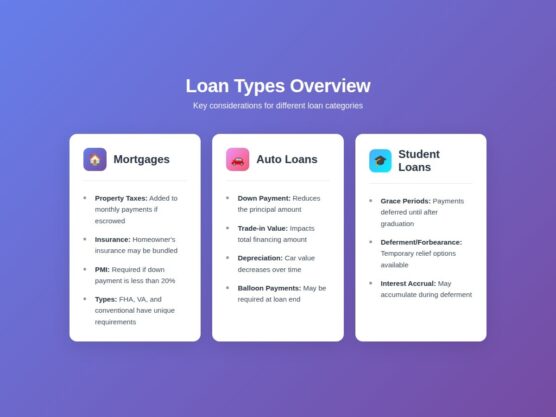
Mortgages usually include additional costs beyond principal and interest:
When calculating auto loans, consider:
For education loans, keep in mind:
Though it may look daunting, the loan amortization schedule calculator is a powerful tool. Consider the following benefits associated with our calculator:
An amortized loan generally involves regularly scheduled payments, with each payment type covering both your interest and the principal. Initially, payments associated with loan amortization are quite interest-heavy. However, they gradually move towards repayment of the principal after some time. Common examples of amortizations include mortgages and personal loans.
Yes, the calculator generally includes taxes and insurance as a part of its calculations. For instance, if you calculate the principal and rate of interest of a personal loan, it will also give you an estimate of the additional GST charges, if asked for.
The calculator provides you with close estimates of several personal, vehicle loans, or even mortgages. However, it is important to understand that the actual payments may differ due to fees, fluctuating rates, or even some lender-specific policies.
The main benefits of prepaying a particular loan are reduced interest costs, freedom from debt, and an improved credit score by lowering your outstanding principal and demonstrating financial discipline. Prepaying allows you to pay off your loan sooner, saving you money and freeing up your finances for other goals.
Yes, the loan amortization calculator allows you to export the schedule in PDF or CSV format. You can even preview the schedule at your convenience to check for accuracy or other updated changes and download it later for your requirements.