A mortgage calculator is an important utility tool that estimates the financial aspects of a home loan, such as the monthly payments (EMI), total interest paid, and loan eligibility. Once you enter the loan amount in the designated box, the rate of interest, and the tenure of the loan, the calculator will show the monthly […]
A mortgage calculator is an important utility tool that estimates the financial aspects of a home loan, such as the monthly payments (EMI), total interest paid, and loan eligibility. Once you enter the loan amount in the designated box, the rate of interest, and the tenure of the loan, the calculator will show the monthly EMI in seconds. Sometimes, the mortgage calculator is also called the loan against property EMI calculator.
It specifically includes a formula box and three key sliders showing your loan amount, duration, and the specified rate of interest. It will display the EMI amount that you must pay the lender every month after you enter the relevant details.
Managing your mortgage becomes quite easier if you already have the complete financial picture upfront. A reliable and accurate mortgage calculator allows you to calculate your EMIs instantly, including the interest outgo and the total loan cost.
Just enter your property value, down payment, and interest rate, and you are good to go! This clarity helps you plan your budget and determine how much house you can actually afford.
| Input | Label | Type / Format |
| Home Value / Property Cost | Property Value (INR) | Numeric amount representing total home price. |
| Down Payment | Down Payment (INR or %) | Either a fixed amount (in $) or a percentage of property value. |
| Loan Amount | Loan Principal (INR) | Auto-calculated as Property Value minus Down Payment. |
| Annual Interest Rate | Interest Rate (% per annum) | Example: 8.5, 9.2, etc. |
| Loan Term | Tenure | Options such as 30 yrs, 25 yrs, 20 yrs, 15 yrs, etc. |
| Start / First Payment Date | Start Date | Default to the current month; selectable via calendar picker. |
After entering all the values, the calculator displays:
A detailed mortgage amortization schedule shows exactly how each monthly payment is divided between interest and principal, and how your remaining balance reduces over time.
| Key Features | Details |
| Sticky Table Header | For Easier Navigation |
| Export Options | CSV and PDF |
| Layout | Print-friendly |
| Filter Toggle | Switch between a detailed monthly view and a yearly summary. |
| Monthly View | Displays every payment and includes the principal, interest, and balance. |
| Yearly Summary | One row per year, and it sums up 12 months of payments for a better overview. |
A mortgage calculator is a simulation that shows you the monthly amount payable to the lender. To calculate the accurate EMI applicable to a particular loan amount, you must use sliders to adjust the values for the Principal Amount (P), Rate of interest (R), and Time Duration (N).
Follow these steps to calculate the EMI on your current or future loan:
The formula used for calculating fixed-rate mortgage payments is:
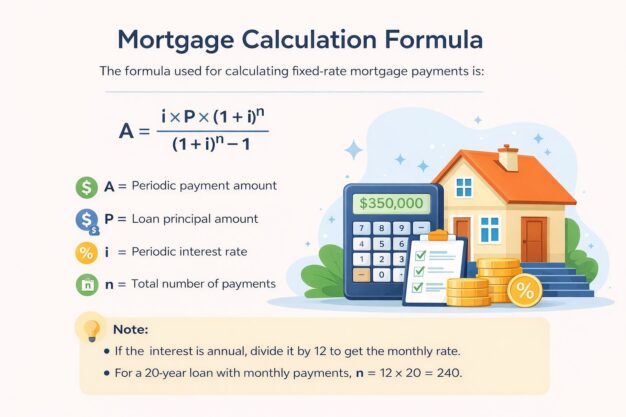
A = [i × P × (1 + i)ⁿ] / [(1 + i)ⁿ – 1]
Where,
A = Periodic payment amount
P = Loan principal amount
i = Periodic interest rate
n = Total number of payments
Note:
Making additional payments toward your principal can help you save significantly on interest and shorten your loan term. For example, paying $5,000 extra each month on a $50 lakh mortgage at 8% interest can save several lakhs over the life of the loan and reduce your tenure by years.
The mortgage calculator shows the EMI you would pay on the loan against the property within a few seconds. It also helps you plan an overall budget for expenses and save more money for important financial goals.
The best part about our calculator is that it is quite easy to use. All you need to do is just enter the requisite inputs to get a clearer picture of the EMI for the upcoming months.
This allows you to save time as you can calculate the EMI even before you apply for a mortgage loan. It also shows you the detailed breakup of the total payments through an accurate loan amortization table.
A mortgage calculator is a valuable tool that allows you to estimate or calculate your monthly mortgage payment. The calculations are specifically based on factors like down payment, property price, and the specified interest rate. Understanding these estimates can help you set a realistic budget for home buying. It also allows you to determine whether you need to save more before purchasing the property.
Yes, you can add property tax and home insurance to the mortgage calculator to get a more realistic picture of your total monthly payments. If you are still confused about the key figures or calculations, you can always reach out to our experts who are available 24/7 to help you with your queries.
Please note that the mortgage calculator provides close estimates based on your provided inputs. However, the actual loan terms may vary slightly depending on lender fees, fluctuating interest rates, and local regulations.
You can reduce mortgage costs by making extra payments, such as paying a lump sum or using a bi-weekly payment plan, to pay down the principal faster. Other options include refinancing for a lower interest rate, appealing property taxes, or negotiating with your lender for a modification like a term extension or a lower monthly payment, even if it means paying more interest over the life of the loan.
Yes, you can easily export or download the mortgage loan amortization schedule in PDF or CSV format for your records.