If you have taken a student loan, you are required to start paying EMIs from the following month. However, what if you don’t have the time to manually calculate your repayment period? That’s where a student loan calculator helps. It provides an accurate estimate of your EMI amount, enabling you to plan and manage your […]
A student loan calculator helps you understand your loan repayment schedule by providing an estimated EMI for your chosen tenure. It enables you to plan your future finances effectively based on the monthly payments displayed.
| Input | Label | Type / Format |
| Loan Amount/ Principal | Loan Amount ($) | A numeric amount in the dollar ($) with multiple separators |
| Annual Interest Rate | Interest Rate (% per annum) | E.g., 7.25, 8.5, etc. |
| Loan Term | Term / Tenure | Years or Months with relevant options, such as 30 years, 20 years, 15 years, 10 years, etc. |
| Start/First Payment Date | Start Date | Default to the current month, along with a calendar picker for better calculations |
After entering values, the calculator will show:
Our amortization schedule provides a complete breakdown of your loan repayment by period, monthly, quarterly, or annually. It displays the remaining amount at the end of each installment as well as the principal and interest breakdown for each payment. This makes it easier for you to monitor your loan repayment progress over the course of the entire term.
Key Features:
Monthly View: Displays every payment and includes the principal, interest, and balance.
Yearly Summary: One row per year, and it sums up 12 months of payments for a better overview.
To determine your monthly EMI, the student loan calculator uses three important inputs: principal amount, interest rate, and loan tenure. The calculator uses a common formula to display the loan cost, total interest payable, and repayment amount when you enter these parameters. This makes it easier for you to examine various repayment choices and arrange your budget.
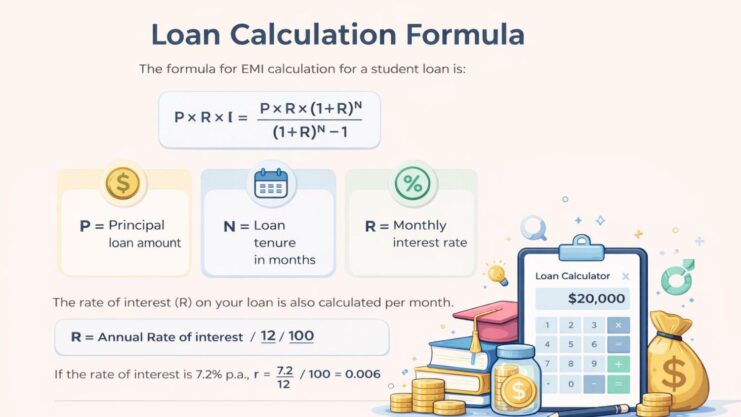
The formula for EMI calculation for a student loan is:
P x R x (1+R)^N / [(1+R)^N-1], where:
P = Principal loan amount
N = Loan tenure in months
R = Monthly interest rate
The rate of interest (R) on your loan is also calculated per month.
R = Annual Rate of interest/12/100
If the rate of interest is 7.2% p.a., r = 7.2/12/100 = 0.006
Both the interest rate and the loan duration can be considerably reduced by making additional payments. For example, paying just $100 extra each month on a $2,50,000 can save thousands in interest and shorten the loan term by several years.
For student loans, keep the following in mind:
Using a calculator ensures transparency, helping to make informed decisions for your future financial commitments. Here are the top benefits of using an online loan calculator before taking a loan.
Learn how repayments are calculated using our Loan Calculator guide to understand different student loan scenarios and plan your finances better.
A student loan calculator is a great tool to determine your loan affordability and estimate your possible EMIs. The exact EMI may fluctuate based on the terms of the loan, changes in interest rates, or other fees. However, it helps you in quickly assessing your budget.
Making extra payments helps reduce your outstanding loan balance faster. It can also lower the total interest payable and shorten your loan tenure. For a clearer picture, you can use our student loan calculator to see how extra payments affect your repayment schedule.
Absolutely. It’s free, simple, and designed to help you make informed decisions.
Yes, for overseas educational costs, you can input the loan amount, interest rate, and term. You can use the calculator to plan your study abroad budget and estimate your monthly EMIs.
Yes, if parents are co-signing or contributing to the student loan repayment, they can use it to organize their budget and predict EMIs.